
Last updated: July 18, 2026
If a game is broken, misleading, inappropriate, or behaving suspiciously, report it from the game’s own play page. Using the page-level Report button connects your report to the correct game and gives the review team the information needed to investigate.
How to submit a game report
- Open the game you want to report on its play page.
- Find the row of controls near the game player.
- Select the button labeled Report.
- Choose the reason that best matches the problem.
- Add a short factual note when it will help explain what happened.
- Submit the report.
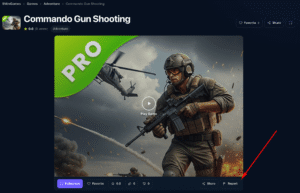
You do not need to send a separate email for an ordinary game problem. The report is stored for review and is not posted as a public comment.
Problems that should be reported
Use the Report button for issues such as:
- The game does not load or remains stuck.
- The controls do not work as expected on your device.
- The page opens the wrong game or uses a misleading title or image.
- The game redirects unexpectedly or behaves in a suspicious way.
- The content appears inappropriate, harmful, or substantially different from its description.
- The game or image may violate copyright or another legal right.
- There is another clear problem that should be reviewed.
What to include in the note
A useful note is brief and specific. Mention what you expected, what happened instead, and the device or browser when relevant. Examples include:
- “The Play button opens a blank screen on mobile.”
- “The game redirects to another website after loading.”
- “Touch controls do not respond in portrait mode.”
- “The thumbnail and title do not match the game.”
Do not include passwords, payment details, a child’s personal information, or other sensitive data.
What happens after a report
We may check whether the game loads, review the page information, test the reported behavior, look for similar reports, or contact a relevant provider. Depending on what we find, we may correct the page, keep the game under review, restrict access, remove it, or close the report without action when the issue cannot be confirmed.
A report does not guarantee immediate removal. Temporary browser, network, or provider problems can affect a game even when the game is otherwise available.
Copyright notices require more information
The Report button can alert us to a possible copyright concern, but a formal request from a copyright owner or authorized representative should follow our Copyright & Takedown Policy. That process asks for the work involved, exact URLs, authority to act, and required statements.
When the Report button is unavailable
If the game page will not open or the Report button cannot be used, email contact@9mingames.com. Include the full game URL, the game title, the problem, and the approximate time it occurred.